> For the complete documentation index, see [llms.txt](https://docs.nexomc.com/llms.txt). Markdown versions of documentation pages are available by appending `.md` to page URLs; this page is available as [Markdown](https://docs.nexomc.com/general-usage/recipes.md).
# Recipes
Recipes can be created directly in the relevant file within the `Nexo/recipes` directory.\
It can also be made in RecipeBuilders with the command `/nexo recipes builder`.\
Drag your desired items into the crafting slots to create your recipe. Make sure to set the "output" slot to the item you want to give.
Each Recipe-type has its own folder in `plugins/Nexo/recipes`, meaning you can organize recipes inside each folder into different files, sub-folders, etc.\
The RecipeBuilder will store recipes inside `plugins/Nexo/recipes/X/X_recipes.yml`, X being the type (shaped, shapeless, etc.)
{% hint style="info" %}
Some Recipe-Types cannot be made through in-game builders, specifically [Predicate Recipes](/general-usage/recipes/predicate-recipes.md)
{% endhint %}
In addition to the specific Recipe-Station types below, there are more special RecipeTypes.
[Predicate Recipes](/general-usage/recipes/predicate-recipes.md) allow you to have more advanced conditions and predicates for a recipe
## Crafting-Table, Crafter & Player-Inventory
#### Shaped Recipes
This is recipes which have a specific shape, and can be filled into PlayerInventory-Grid,\
Crafting Table or Crafters in any orientation and order\
`amount` in result specifies how many of said item you should get.\
Using `amount` for an Ingredient will require that many to exist in the grid for each slot.
```yaml
amount_recipe_example:
result:
nexo_item: forest_axe
shape:
- 'SSS'
- ' W '
- ' W '
ingredients:
S:
minecraft_type: DIAMOND
amount: 2
W:
minecraft_type: WATER_BUCKET
```
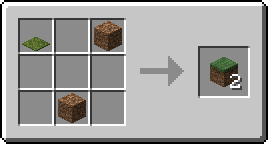
#### Shapeless Recipes
This is recipes which have no specific shape, and can be filled into PlayerInventory-Grid,\
Crafting Table or Crafters in any orientation and order
`amount` in result specifies how many of said item you should get.\
Using `amount` for an Ingredient will require that many to exist in the grid in one or more slots.
```yaml
grass_block_shapeless:
result:
minecraft_type: GRASS_BLOCK
amount: 2
ingredients:
A:
minecraft_type: MOSS_CARPET
B:
minecraft_type: DIRT
C:
minecraft_type: DIRT
```
#### Crafter Recipes
These are recipes which will only work in the Crafter block.\
*These will not work in PlayerInventory or Crafting Tables*
```yaml
crafter_only_axe:
result:
nexo_item: forest_axe
shape:
- 'DDD'
- ' S '
- ' S '
ingredients:
D:
minecraft_type: DIAMOND
S:
minecraft_type: BLAZE_ROD
```
#### Preserving Components
An ingredient can carry data-components over onto the result with `preserve`.\
This lets a recipe upgrade an item without wiping its durability, enchantments or name.\
It works for Shaped, Shapeless & Crafter recipes.
```yaml
forest_axe_upgrade:
result:
nexo_item: forest_axe
shape:
- ' D '
- 'DAD'
- ' D '
ingredients:
A:
minecraft_type: DIAMOND_AXE
preserve:
- damage
- enchantments
- custom_name
D:
minecraft_type: DIAMOND
```
Components the ingredient does not have are left as the result defines them.\
If several ingredients preserve the same component, it is taken from the first of them in the grid.
***
## Furnace, Blasting, Smoker & Campfire
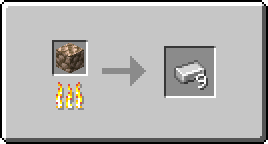
#### Furnace, Blasting & Smoking Recipes
Furnace, Blasting & Smoking recipes function the same, but allow you to split them us in order to have various requirements for each station.
```yaml
raw_iron_block_to_iron:
result:
minecraft_type: IRON_INGOT
amount: 9
input:
minecraft_type: RAW_IRON_BLOCK
cookingTime: 100
experience: 20
```
#### Campfire Recipes
Campfire recipes are again largely the same as the stations above, but can cook several different recipes at the same time.
```yaml
forest_axe_from_campfire:
input:
minecraft_type: NETHERITE_AXE
result:
nexo_item: forest_axe
cookingTime: 100
experience: 2
```
***
## Stonecutter Recipes
```yaml
stripped_spruce_log:
result:
minecraft_type: STRIPPED_SPRUCE_LOG
input:
minecraft_type: SPRUCE_LOG
```
***
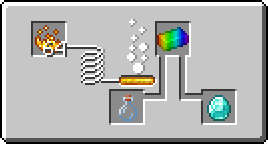
## Brewing Stand Recipes
```yaml
diamond:
result:
minecraft_type: DIAMOND
input:
minecraft_type: GLASS_BOTTLE
ingredient:
nexo_item: rainbow_ingot
```
***
## Smithing Recipes
Smithing Recipes allow for several new ways to handle crafting, upgrading and customizing items.\
Nexo adds all of these with Custom-Recipes that can be used in a bunch of combinations
*These recipes do not support* [Predicate Recipes](/general-usage/recipes/predicate-recipes.md)options
#### Upgrade Recipes
To make a recipe where you "upgrade" an item from A to B, it needs to copy the data.\
This preserves names, lore, enchantments and so on.\
For example for upgrading an *Iron Backpack* -> *Diamond Backpack*
```yaml
forest_sword_upgrade:
template:
minecraft_type: NETHERITE_UPGRADE_SMITHING_TEMPLATE
base:
nexo_item: forest_sword
addition:
minecraft_type: NETHERITE_INGOT
result:
nexo_item: forest_axe
copy_components: true
```
#### Custom Trim Recipes
To make a recipe which lets you put any Trim-Pattern on an item, custom via a datapack or vanilla, you can follow the example below. This can be any custom item, vanilla or anything.
```yaml
paper_template_trim:
template:
minecraft_type: PAPER
base:
minecraft_type: IRON_CHESTPLATE
addition:
minecraft_type: AMETHYST_SHARD
trim_pattern: minecraft:silence
```
***
## Disabling Recipes
There is also a new file for disabling recipes in `Nexo/recipes/disabled_recipes.yml` .\
In this file, simply add the Recipe-Key, `minecraft:vanilla_recipe` , and Nexo will disable it.