# Dialogs

Nexo simplifies the process of adding new Dialogs to your server.\
Instead of needing to make a datapack, you can do it all in a YAML file inside `plugins/Nexo/dialogs` .

Dialogs are made up of a few different parts.\
A [DialogType](/configuration/dialogs/dialogtype.md) - Specifies properties at the root of the Dialog\
A [DialogBase](/configuration/dialogs/dialogbase.md) - The content of the Dialog
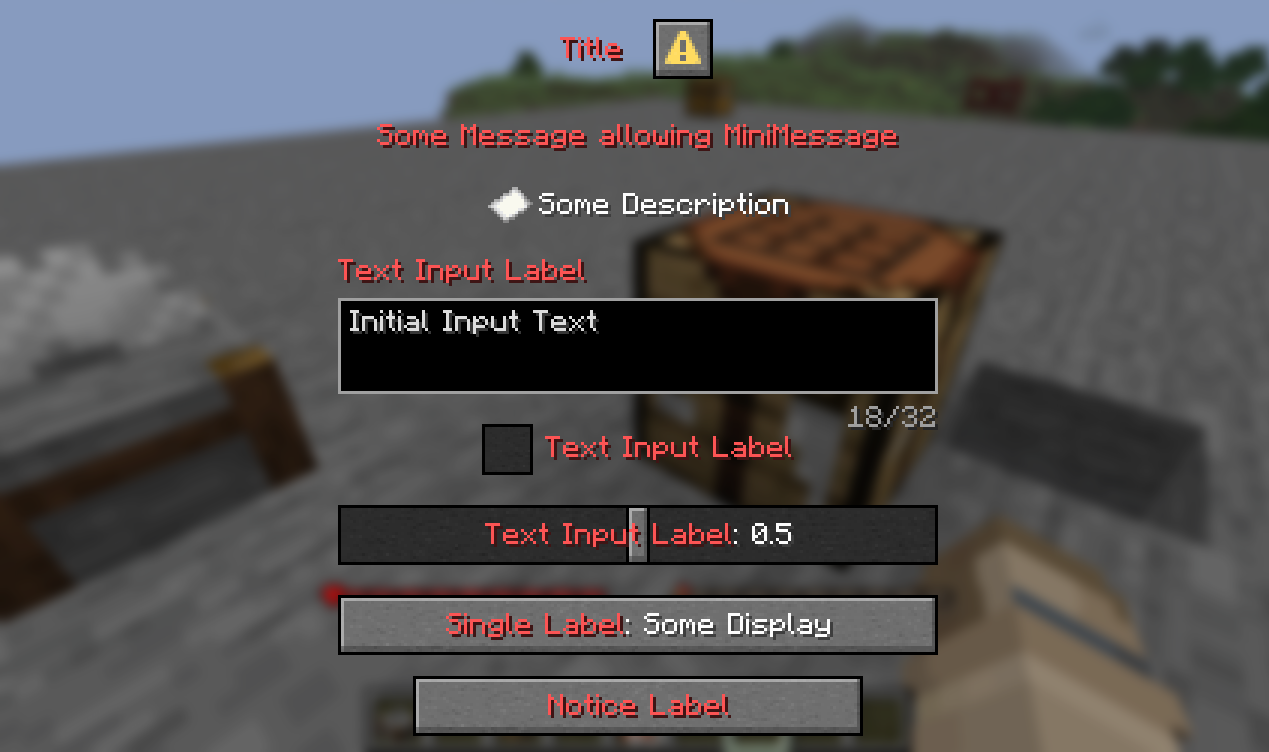
<figure><img src="/files/DkVsfTA99MUUYF1o4DNO" alt=""><figcaption><p>Example of Dialog using all available methods</p></figcaption></figure>

```yaml
type: NOTICE
action:
  label: "<red>Notice Label"
  tooltip: "<red>Notice Tooltip"
  width: 150
  action:
    type: RUN_COMMAND
    command: "nexo inventory"
base:
  title: "<red>Title"
  externalTitle: "External Title"
  canCloseWithEscape: true
  afterAction: CLOSE
  bodies:
    message_body:
      type: MESSAGE
      message: "<red>Some Message allowing MiniMessage"
      width: 200
    item_body:
      type: ITEM
      description: "Some Description"
     #description:
     #  contents: "<red>Some description"
     #  width: 200
      showDecorations: true
      showTooltip: true
      width: 16
      height: 16
  inputs:
    text_key:
      type: TEXT
      width: 200
      label: "<red>Text Input Label"
      labelVisible: true
      maxLength: 32
      initial: "Initial Input Text"
      multilineOptions:
        maxLines: 1
        height: 32
    bool_key:  
      type: BOOL
      label: "<red>Boolean Input Label"
      initial: true
      onTrue: "some_action"
      onFalse: "some_action"
    number_key:
      type: NUMBER
      width: 200
      label: "<red>Number Input Label"
      labelFormat: "options.generic_value"
      start: 0
      end: 1
      initial: 0.5
      step: 0.1
    single_key:
      type: SINGLE
      width: 200
      label: "<red>Single Input Label"
      labelVisible: true
      options:
        option_1:
          display: "First Option"
          initial: true
        option_2:
          display: "Second Option"
          initial: false
```


---

# Agent Instructions: Querying This Documentation

If you need additional information that is not directly available in this page, you can query the documentation dynamically by asking a question.

Perform an HTTP GET request on the current page URL with the `ask` query parameter:

```
GET https://docs.nexomc.com/configuration/dialogs.md?ask=<question>
```

The question should be specific, self-contained, and written in natural language.
The response will contain a direct answer to the question and relevant excerpts and sources from the documentation.

Use this mechanism when the answer is not explicitly present in the current page, you need clarification or additional context, or you want to retrieve related documentation sections.
